Which HoloBuilder Alternative Turns Your Site Walks Into a Progress Report?
Pinning every 360° photo on the plan by hand takes longer with each floor the building gains. SpatialSense turns a walk into a path drawn on your floor plan, keeps the scans and drone flights beside it, and writes a progress report from two dated walks. Try it on one of your own sites for 30 days, with no card details.
Updated 9 November 2026 · Written by Kodifly, the company that makes SpatialSense
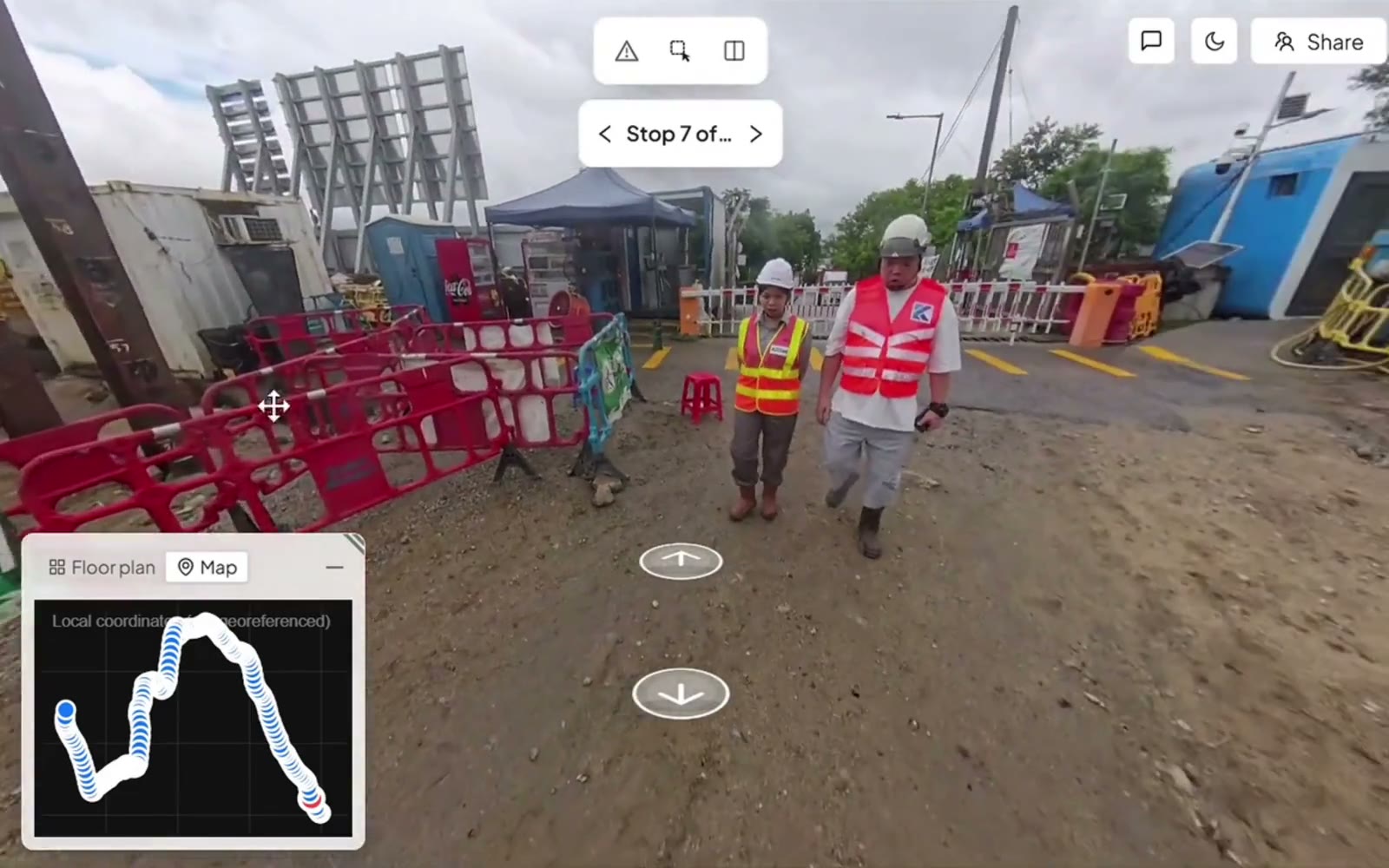
Pinning an issue to the spot in a 360° walk, in SpatialSense.
What HoloBuilder users run into, and how SpatialSense helps
If you are the one walking the floors with a 360° camera, the walk is only half the job: then comes placing every photo on the right sheet before anyone else can use it. These are the problems HoloBuilder users describe in app-store and review-site posts, in plain words, with what SpatialSense does about each one.
What users report
Every photo pinned on the plan by hand
Users say they drop a pin on the sheet for each 360° photo, set up every sheet and photo location themselves, and have to go to the website to move or delete a point. One reviewer ties the effort to large floor plans and buildings with several levels.
Reported in App Store reviews (2020–2025) and on SoftwareFinder
How SpatialSense handles it
A walk recorded with Trace, the SpatialSense capture app, uploads with its path already drawn on the floor plan, as long as the plan was added first, and every video frame carries its GPS position and time. Plans go in as PDF, DWG or DXF. Trace is set up when you book a demo; in the trial you upload 360° panoramas in the browser.
What users report
New cameras that don’t connect reliably
In 2025, users say the app didn’t work with an Insta360 camera listed as compatible, and one says they reinstall the app every day to keep it working. The app’s own update notes from May 2025 list fixes for stitching and white images on newer Insta360 models.
Reported in App Store reviews (2025); fixes listed in the app’s version history
How SpatialSense handles it
Trace records with the Insta360 X4 or X5 on a helmet or a car. If you use another 360° camera, its footage uploads through the browser, so a camera that won’t pair with an app doesn’t stop the walk. And if something does go wrong, a person at Kodifly answers at any hour.
What users report
Weak signal and Wi-Fi-only sync
Users say they have to shut down and reconnect in areas with poor signal, that changes sync only over Wi-Fi, and that downloads take a while.
Reported on SoftwareFinder and in App Store reviews
How SpatialSense handles it
Trace records with no signal at all. You assign the walk to its survey once you are back online, so a basement, a car park or a remote plot never costs you the walk.
What users report
Point clouds as a separate package
HoloBuilder’s pricing page lists Point Cloud Management as a package of its own next to the Project and Enterprise packages, with no prices shown, and reviewers on Trustpilot and SoftwareFinder say the pricing could be better.
Stated on HoloBuilder’s pricing page; reported on Trustpilot (2025) and SoftwareFinder
How SpatialSense handles it
In SpatialSense, 360° walks, laser scans from any maker and drone flights sit in one project on every plan. Pricing is per site with unlimited users and published on the pricing page, and the 30-day trial unlocks all of it with no card.
What you are after is a walk that is finished when you stop walking: on the plan, next to last week’s, and ready for the client, so you are the one with the record rather than the one still placing pins at the end of the day.
Is SpatialSense the right HoloBuilder alternative for you?
SpatialSense is built for site teams who document their floors with 360° walks and need the result on the plan without an evening of placing photos. It keeps walks, scans and drone flights in one project, writes progress from two dated walks, and you can see it working on one of your own sites inside 30 days, with no card.
SpatialSense fits if
Placing photos on the plan eats your day. A Trace walk lands on the floor plan with its path drawn, and every frame carries its position and time.
Your client wants progress in writing. From two dated walks SpatialSense writes a station-by-station progress report tied to the images and delivered as a PDF, and any two dates open side by side from one locked viewpoint.
Your scans come from more than one maker. Laser scans from any maker load as E57, LAS, LAZ, PCD or PLY into the same project as the walks and drone flights, and fixed LiDAR stations can scan a zone every 15 to 30 minutes with nobody on site.
You want a longer trial on your own files. The trial covers the full platform for 30 days with no credit card, and support is one-to-one with a person at Kodifly, 24 hours a day.
How does SpatialSense compare with HoloBuilder?
The two differ most on progress and on scans. HoloBuilder leaves progress to be compared by eye and names FARO’s own scanners, while SpatialSense writes progress up from two dated walks and reads laser scans from any maker.
SpatialSense
HoloBuilder
360° walks
The Trace app with an Insta360 X4 or X5 on a helmet or a car
360° photos mapped to the floor plan through the JobWalk app, with Ricoh Theta Z1, SC2 and X or Insta360 Pro 2, X5 and X4 cameras
Laser scans and drones
Scans from any maker as E57, LAS, LAZ, PCD or PLY, drone flights, and fixed LiDAR stations that scan a zone every 15 to 30 minutes with nobody on site
FARO Orbis, Blink and Focus scans, SiteScape LiDAR on an iPhone or iPad, imported .laz, .e57 or .cpe point clouds up to 50 GB, and drone image uploads
BIM models and plans
IFC models, including Revit models exported to IFC, open in the browser beside the point cloud and the 360° walks, with the model overlaid on the scan so you see the as-built next to the design; floor plans as PDF, DWG or DXF
.nwd, .nwc, .rvt, .dwf and .ifc models, with IFC 4 not fully supported, and point clouds shown over the model; plans as images or PDFs
Progress evidence
Any two dates side by side from one locked viewpoint, and a station-by-station PDF report from two dated walks, tied to the images
TimeTravel through capture dates and Split Screen beside the plan; no schedule-based or automated progress is published
Issues
Pinned in the walk or scan with an owner and a due date, answered from the Konnect app, with WhatsApp alerts in the recipient’s language
Issues and RFIs raised in Autodesk Construction Cloud, and observations and RFIs in Procore
People outside the paid team
Unlimited users, and revocable share links that open without a login
Admin, Editor and Viewer roles; a project shared via link needs no account, and seat terms for invited viewers are not published
Pricing and trial
Per-site pricing with unlimited users (current prices), and a 30-day trial with no credit card
Customisable Project and Enterprise packages with no published prices, Point Cloud Management as a package of its own, and a 21-day free trial requested through a form
What it looks like in SpatialSense
Any two dates, side by side
Open two walks of the same spot from one locked viewpoint and see what changed between them.
Issues with an owner and a date
Pin a problem to the spot in the walk, assign it, and get the answer back from the Konnect app.
A link your client can open
Send a share link that opens in the browser without a login, and revoke it when the job is done.
Moving from HoloBuilder to SpatialSense
You can test SpatialSense on one site without changing how the rest of your projects run.
Gather the originals. Collect the scans as E57, LAS or LAZ, the model as IFC and the floor plans as PDF, DWG or DXF. SpatialSense reads the same .e57 and .laz files you imported into HoloBuilder.
Start the trial. The 30-day trial unlocks the full platform with every feature and needs no credit card.
Upload one site. Put its plans, scans and model in one project and judge it against the HoloBuilder record you know.
Add your 360° walks. Upload 360° panoramas from your current camera in the browser, or book a demo and Kodifly sets up Trace, the capture app that records with an Insta360 X4 or X5 on a helmet or a car. After two dated walks you get the side-by-side view and the progress report.
Bring in the client. Invite the whole team, since users are unlimited, and send the client a share link that opens without a login.
Frequently asked questions
What is the best alternative to HoloBuilder?
SpatialSense. It keeps 360° walks, laser scans from any maker and drone flights in one project, writes a station-by-station progress report from two dated walks, and gives your client a share link that opens without a login. Every plan has unlimited users, and you can try the full platform on your own files for 30 days with no card details.
Who are HoloBuilder’s main competitors?
SpatialSense competes with HoloBuilder, now sold as FARO Sphere XG, for teams that document a site with 360° walks. SpatialSense writes a station-by-station progress report from two dated walks, keeps laser scans from any maker and drone flights in the same project, and gives every plan unlimited users.
How does HoloBuilder show progress?
By eye. TimeTravel steps through capture dates and Split Screen sets the plan beside the site, and HoloBuilder’s current pages publish no schedule import or automated progress. SpatialSense opens any two dates side by side from one locked viewpoint, and from two dated walks it writes a station-by-station progress report tied to the images it was read from and delivered as a PDF, so the client gets the evidence in writing.
Does HoloBuilder work with BIM models?
Yes. HoloBuilder imports 3D models, including IFC files, though its help pages say IFC 4 is not fully supported, and it shows point clouds over the model. SpatialSense works with BIM as well. IFC models, including Revit models exported to IFC, open in the browser beside the point cloud and the 360° walks, with the model overlaid on the scan so you see the as-built next to the design, and the whole team can open them, since every plan has unlimited users.
Does HoloBuilder support laser scans?
Yes. HoloBuilder takes scans from FARO Orbis, Blink and Focus devices and from SiteScape LiDAR on an iPhone or iPad, and it imports .laz, .e57 or .cpe point clouds of up to 50 GB. SpatialSense takes laser scans from any maker as E57, LAS, LAZ, PCD or PLY, in the same project as the 360° walks and drone flights, and its fixed LiDAR stations can scan a zone every 15 to 30 minutes with nobody on site.
How much does HoloBuilder cost?
FARO publishes no prices for HoloBuilder. It sells customisable Project and Enterprise packages, with Point Cloud Management as a package of its own, and offers a 21-day free trial requested through a form. SpatialSense has per-site pricing with unlimited users (current prices), a Lite Viewer that is free forever, with no account and no time limit, and a 30-day free trial that unlocks the full platform with every feature and needs no card details.
Can I keep the 360° camera we use with HoloBuilder?
If it is an Insta360 X4 or X5, yes. Both are on FARO’s camera list for HoloBuilder, and they are the cameras the SpatialSense Trace app uses, on a helmet or on a car.
What do HoloBuilder users complain about?
In App Store reviews and on SoftwareFinder and Trustpilot, HoloBuilder users mention pinning every 360° photo on the plan by hand, newer cameras that don’t connect reliably, weak signal and Wi-Fi-only sync, and point clouds sold as a separate package. In SpatialSense, a Trace walk uploads with its path drawn on the plan, records with no signal, other cameras upload through the browser, and walks, scans and drone flights are on every plan, with a 30-day trial that needs no card.
See SpatialSense on your project
Every floor the building gains is another sheet of photos to place by hand. Start the 30-day free trial on one of your own sites today, with no credit card and unlimited users, or book a demo and Kodifly sets it up with Trace for you. Support comes from a person at Kodifly around the clock.
HoloBuilder (FARO Sphere XG): platform, data capture, cameras, data management, AEC, innovation, integrations, free trial, and help articles on point clouds, 3D models, roles and public projects; read 4 November 2026
HoloBuilder: pricing page and JobWalk help articles on capture, compatible cameras and camera connection; read 9 November 2026
FARO Sphere on faro.com; read 4 November 2026
JobWalk Construction Tracking reviews and version history on the Apple App Store (US and UK) and on JustUseApp; read 9 November 2026
HoloBuilder reviews on SoftwareFinder and Trustpilot; read 9 November 2026
SpatialSense is not affiliated with HoloBuilder. User reports are summarised from public reviews and forum posts; product information accurate as of 9 November 2026. Verify current features and pricing with the vendor.